About Snapmaker
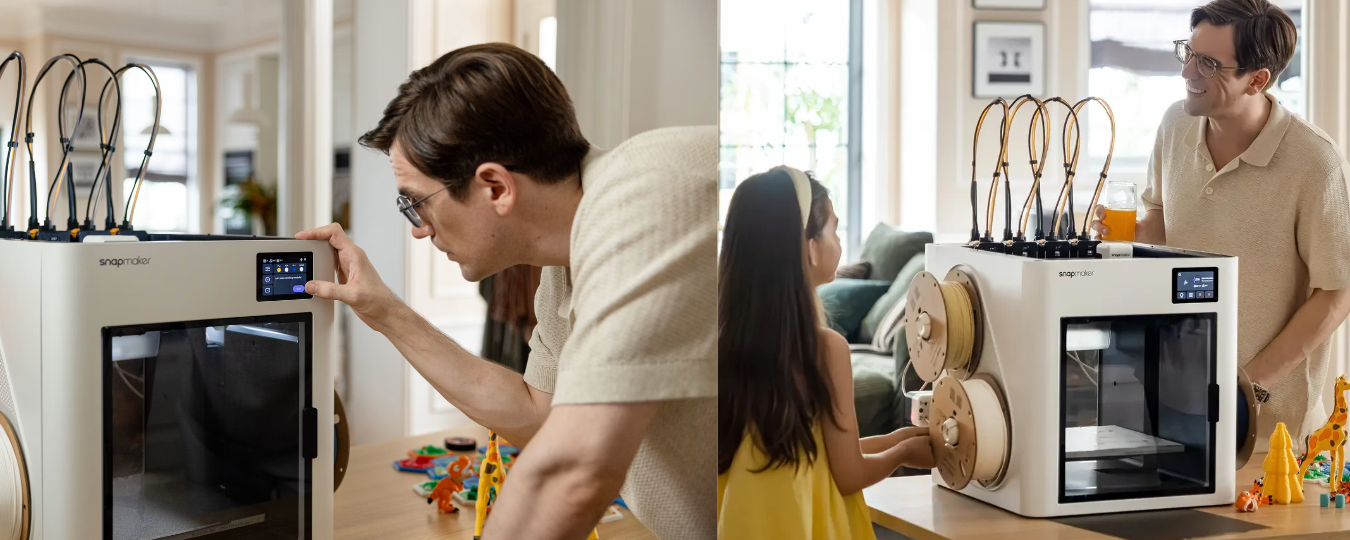
Snapmaker creates versatile machines for makers, designers, and creative professionals. Its range includes 3D printers, laser engravers, CNC machines, and accessories. The company combines advanced technology with practical designs. Its Snapmaker U1 features a four-toolhead system for convenient multi-color and multi-material 3D printing.
What Is the Snapmaker U1 3D Printer?
The Snapmaker U1 is a multi-color 3D printer with four independent toolheads. Its SnapSwap technology changes toolheads in approximately five seconds, reducing filament waste. Additionally, its CoreXY system delivers speeds up to 500 mm/s, while the 270 × 270 × 270 mm build volume supports larger projects.
Who Should Consider the Snapmaker U1?
The Snapmaker U1 suits users who create colorful models, prototypes, and personalized products. Hobbyists and small businesses can use it for toys, gifts, and branded items. However, beginners should consider their budget and printing needs before choosing its advanced tool-changing features.
Key Features of the Snapmaker U1 3D Printer
Four Independent Toolheads
The four-toolhead system stands out as one of the U1's biggest advantages. Each toolhead holds its own filament and stays ready for printing. Therefore, users can combine up to four colors in one model. This setup also supports different material combinations. For example, creators can combine rigid materials with flexible components.
SnapSwap Technology for Faster Changes
Snapmaker's SnapSwap technology makes tool changes quick and convenient. The printer switches between independent toolheads in approximately five seconds. As a result, users spend less time waiting during multi-color printing. Additionally, this mechanism reduces the need for extensive filament purging.
High-Speed Printing Performance
Printing speed matters when users create multiple models or handle larger projects. Fortunately, the Snapmaker U1 supports toolhead speeds of up to 500 mm/s. Its acceleration also reaches 20,000 mm/s². The CoreXY motion system and lightweight carbon-fiber X-axis support responsive movement.
Large Build Volume
The U1 provides a spacious 270 × 270 × 270 mm build volume. This space accommodates larger models and multiple smaller objects. Therefore, users can complete more projects without splitting every design into separate parts. Its generous build area also benefits small production workflows.
Smart Calibration Features
Proper calibration helps produce accurate and consistent prints. Fortunately, the Snapmaker U1 includes several automatic calibration features. These include mesh bed leveling, pressure advance, and input shaping. The printer also calibrates toolhead offsets automatically. Consequently, users can maintain better alignment between different colors and materials.
Design and Build Quality
The Snapmaker U1 features a sturdy frame and a practical desktop design. It measures approximately 584 × 499 × 730 mm. Additionally, its weight is around 18.2 kg. Its CoreXY structure supports fast and controlled movement. Meanwhile, the flexible steel build plate features a PEI surface. This design helps users remove completed prints more conveniently.
Pros and Cons of the Snapmaker U1
Pros
- Four independent toolheads support up to four colors.
- SnapSwap technology enables approximately five-second tool changes.
- Reduces filament waste during multi-color printing.
- Supports multiple materials for creative applications.
- Provides a spacious 270 mm cubed build volume.
- Includes automatic calibration and monitoring features.
- Supports printing speeds of up to 500 mm/s.
Cons
- Its advanced features may exceed casual users' requirements.
- The printer requires considerable workspace.
- Its 18.2 kg weight makes relocation less convenient.
- Some engineering materials require optional accessories.
- Four-toolhead technology may require additional maintenance and setup knowledge.
Is the Snapmaker U1 3D Printer Worth Buying?
The Snapmaker U1 features independent toolheads, fast switching, and a generous build volume. Additionally, automatic calibration simplifies printing. These features make it ideal for multi-color projects and batch production. However, simple printing needs may suit a more affordable machine. The official Snapmaker website provides pricing, accessories, and product details.
FAQs
How Many Colors Can the Snapmaker U1 Print?
The Snapmaker U1 supports up to four colors in one print. Its four independent toolheads each hold a separate filament.
What Is the Build Volume of the Snapmaker U1?
The printer offers a 270 × 270 × 270 mm build volume. This space accommodates larger models and multiple smaller projects.
How Fast Can the Snapmaker U1 Print?
The Snapmaker U1 supports maximum toolhead speeds of up to 500 mm/s. However, materials and printing settings affect actual speeds.
What Materials Does the Snapmaker U1 Support?
Its standard configuration supports PLA, PETG, TPU, PVA, and PCTG. Additionally, optional accessories expand compatibility with several engineering materials.
The Snapmaker U1 offers four independent toolheads, fast switching, and smart calibration. Its spacious build volume supports creative and professional projects. Moreover, multi-color printing and reduced filament waste improve efficiency. Although its advanced features may challenge beginners, it suits serious makers seeking versatile 3D printing. Check its latest specifications and offers at the official Snapmaker store.
Stay tuned to Gadgets Now Way to explore more about the Snapmaker U1 3D Printer.